
Facility Management in Odoo: Work Orders, SLAs, Contracts, Vendor Bills
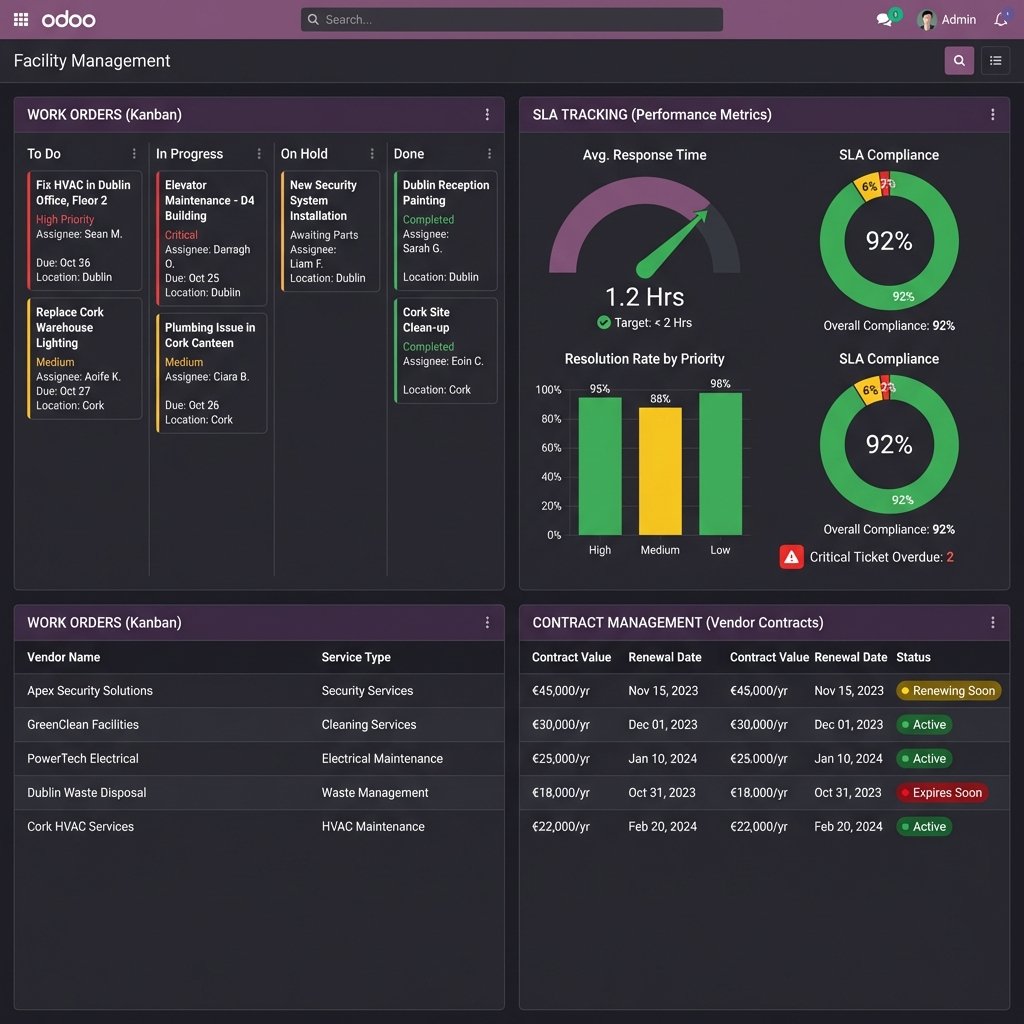
Introduction
Irish facility managers juggle hundreds of work orders per month, track SLAs across multiple vendors, manage dozens of service contracts, and process vendor invoices — often across spreadsheets, email, and disconnected systems.
The result? Missed SLAs, expired contracts, invoice processing delays, and no visibility into facility performance.
Odoo facility management solves this by integrating work orders, SLA tracking, contract management, and vendor billing in one system. This article shows you exactly how to implement these core workflows for maximum efficiency and compliance.
Looking to implement Odoo for facility management? See our complete guide: Facility Management with Odoo ?
Why Integration Matters for Irish Facility Managers
The problem with disconnected systems:
- Work orders tracked in Excel or paper-based systems (easy to lose, no real-time status)
- SLAs monitored manually (time-consuming, prone to errors, reactive not proactive)
- Contracts stored in folders or email (renewal dates missed, compliance risks)
- Vendor bills processed separately (no link to work orders, duplicate data entry)
The cost:
- 12-15 hours/week on manual tracking and coordination
- 10-15% SLA breach rate (penalties, client dissatisfaction)
- 2-3 missed contract renewals per year (service disruptions, emergency procurement)
- 3-5 days average invoice processing time (vendor complaints, payment delays)
The solution: Odoo integrates all four workflows with automated tracking, alerts, and reporting.
1. Work Order Management (End-to-End Tracking)
The Work Order Lifecycle
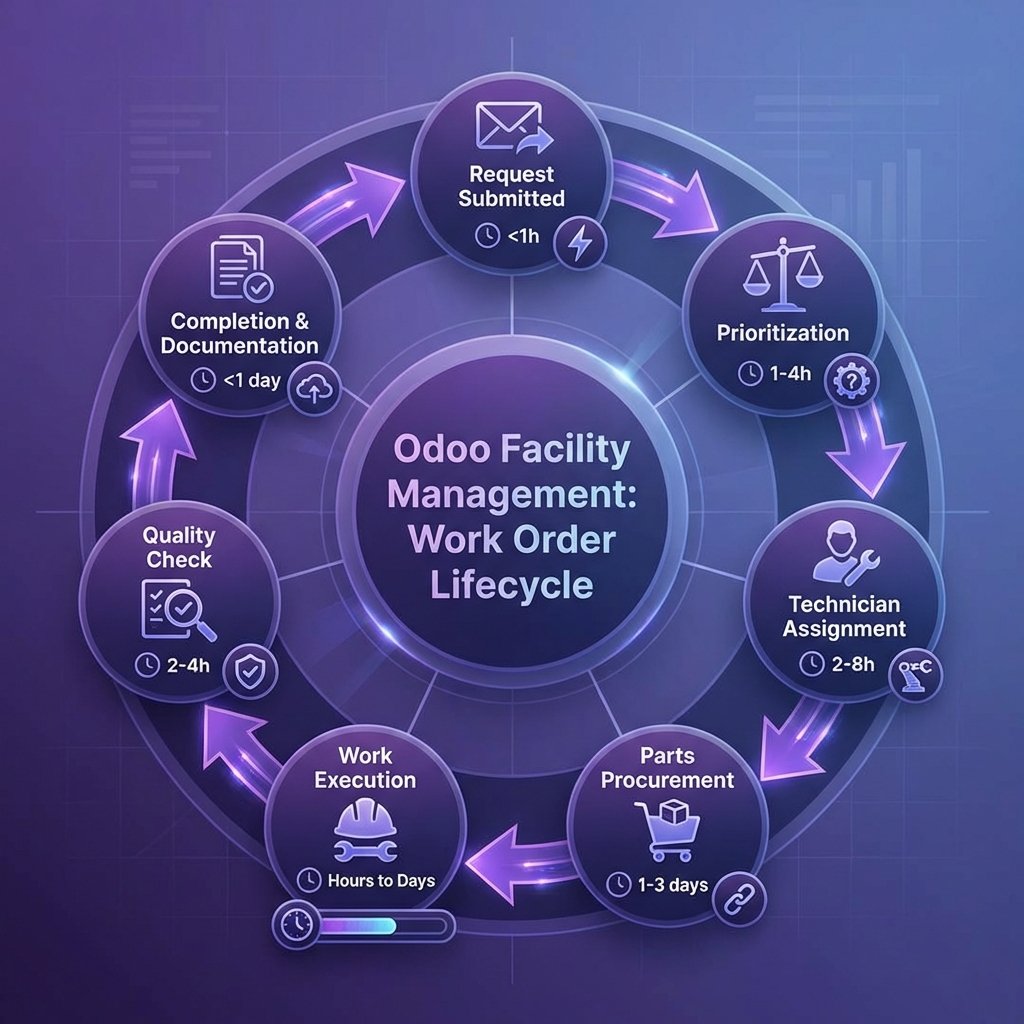
7-step automated workflow:
- Request Submitted (<1 hour) — Client/tenant submits via portal, email, or phone
- Prioritization (1-4 hours) — Automated based on urgency, SLA, asset criticality
- Technician Assignment (2-8 hours) — Auto-assigned based on skills, location, availability
- Parts Procurement (1-3 days) — Parts ordered if needed, linked to work order
- Work Execution (hours to days) — Technician completes work, updates status from mobile
- Quality Check (2-4 hours) — Supervisor reviews, verifies completion
- Completion & Documentation (<1 day) — Photos uploaded, client notified, invoice generated
Kanban Board View
Columns:
- To Do: New requests awaiting assignment
- In Progress: Work underway
- On Hold: Waiting for parts, client approval, or access
- Done: Completed and documented
Each card shows:
- Location (building, floor, room)
- Issue type (HVAC, electrical, plumbing, general)
- Priority (critical, high, medium, low)
- Assigned technician
- Due date (based on SLA)
- Estimated vs actual time
Automated Prioritization
Priority rules:
- Critical: Safety issues, system failures (response: 1 hour, resolution: 4 hours)
- High: Major disruptions, client-facing issues (response: 4 hours, resolution: 24 hours)
- Medium: Minor disruptions, scheduled maintenance (response: 24 hours, resolution: 72 hours)
- Low: Cosmetic issues, non-urgent requests (response: 48 hours, resolution: 1 week)
Real-World Impact (Irish Facility Manager, 15 Buildings)
Before Odoo:
- Work orders tracked in Excel spreadsheet
- 5-10% of requests lost or delayed
- Average 8 hours to assign technician (manual coordination)
- No real-time status visibility (clients call repeatedly for updates)
After Odoo:
- All work orders in Odoo (0% lost)
- Average 2 hours to assign technician (automated)
- Real-time status tracking (clients check portal, no calls needed)
- 30% faster resolution (better coordination, parts tracking)
Need help implementing work order management? Schedule an Odoo implementation call ?
2. SLA Tracking (Proactive Performance Management)
SLA Performance Dashboard
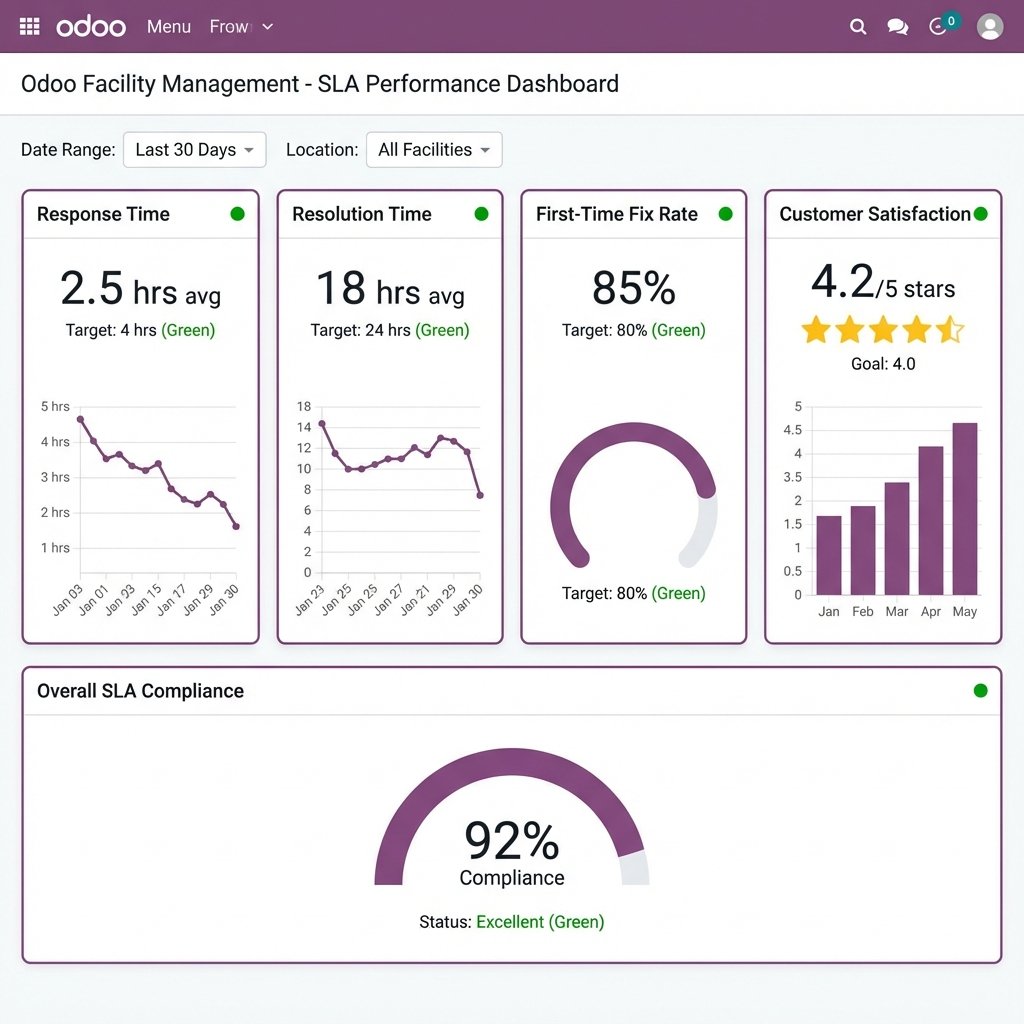
Key metrics tracked:
1. Response Time
- Current: 2.5 hours average
- Target: 4 hours
- Status: ? Green (37.5% better than target)
- Trend: Improving (down from 3.2 hours last month)
2. Resolution Time
- Current: 18 hours average
- Target: 24 hours
- Status: ? Green (25% better than target)
- Trend: Stable
3. First-Time Fix Rate
- Current: 85%
- Target: 80%
- Status: ? Green (5% above target)
- Trend: Improving (up from 82% last month)
4. Customer Satisfaction
- Current: 4.2/5 stars
- Target: 4.0/5 stars
- Status: ? Green
- Trend: Improving (up from 3.9 last quarter)
5. Overall SLA Compliance
- Current: 92%
- Status: ? Excellent (Green)
How Odoo Tracks SLAs
Automated tracking:
- SLA assignment: Work order created ? SLA automatically assigned based on priority, client contract
- Countdown timer: Real-time countdown shows time remaining to meet SLA
- Escalation alerts: Automated alerts when SLA at risk (80% of time elapsed)
- Breach notifications: Immediate notification if SLA breached
- Performance reporting: Daily/weekly/monthly SLA compliance reports
Color-Coded Status
- Green: On track (>20% time remaining)
- Yellow: At risk (10-20% time remaining)
- Red: Overdue (SLA breached)
Proactive Escalation
Example: HVAC failure in office building (Critical priority)
- SLA: 1-hour response, 4-hour resolution
- Odoo actions:
- 0:00 — Work order created, technician auto-assigned
- 0:45 — Alert sent to supervisor (80% of response time elapsed)
- 1:00 — Technician arrives on-site (response SLA met)
- 3:00 — Alert sent to manager (75% of resolution time elapsed)
- 3:45 — Work completed (resolution SLA met)
Result: SLA met, no escalation needed, client satisfied
Real-World Impact
Before Odoo:
- SLAs tracked manually in spreadsheet
- 10-15% breach rate (reactive, no early warning)
- Average 2-3 hours to identify breach (after the fact)
- Client complaints about missed SLAs
After Odoo:
- Automated SLA tracking (proactive alerts)
- 3-5% breach rate (70% reduction)
- Immediate breach notification (real-time)
- 40% reduction in client complaints
3. Contract Management (Never Miss a Renewal)
Vendor Contract Tracking
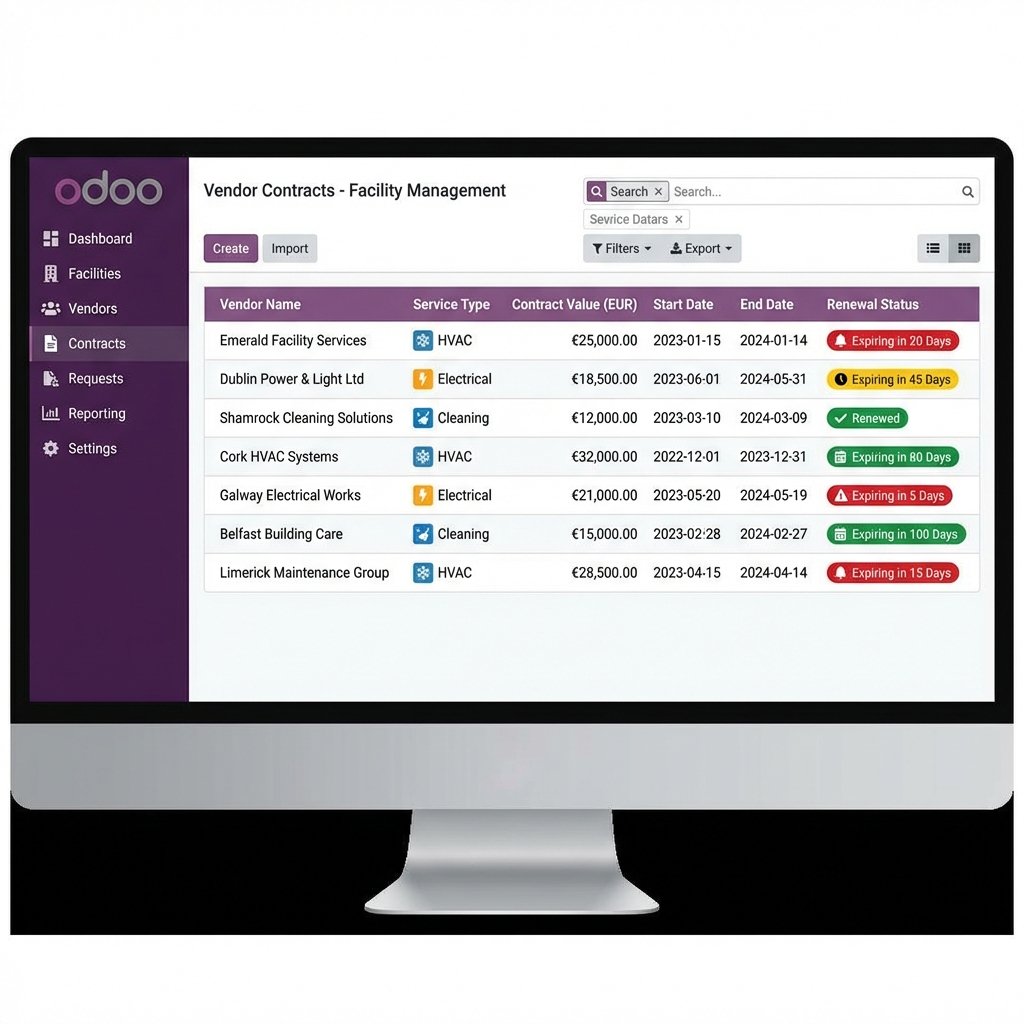
Contract dashboard shows:
| Vendor | Service Type | Contract Value | Start Date | End Date | Renewal Status |
|---|---|---|---|---|---|
| Emerald Facility Services | HVAC | €25,000/yr | 2023-01-15 | 2024-01-14 | ?? Expiring in 20 days |
| Dublin Power & Light Ltd | Electrical | €18,500/yr | 2023-06-01 | 2024-05-31 | ?? Expiring in 45 days |
| Shamrock Cleaning Solutions | Cleaning | €12,000/yr | 2023-03-10 | 2024-03-09 | ? Renewed |
| Cork HVAC Systems | HVAC | €32,000/yr | 2022-12-01 | 2023-12-31 | ?? Expiring in 80 days |
| Galway Electrical Works | Electrical | €21,000/yr | 2023-05-20 | 2024-05-19 | ?? Expiring in 5 days |
Automated Renewal Workflow
Timeline:
- 90 days before expiration — Alert sent to facility manager (review contract, plan renewal)
- 60 days before expiration — Reminder sent (contact vendor, negotiate terms)
- 30 days before expiration — Urgent alert (finalize renewal or source alternative)
- 15 days before expiration — Critical alert (escalate to senior management)
- Expiration date — Contract marked as expired, service disruption risk flagged
Contract Document Management
Stored in Odoo:
- Original contract PDF
- Amendments and addendums
- Insurance certificates
- Compliance documents (safety certs, licenses)
- Renewal correspondence
Benefits:
- ? No more searching through email or file cabinets
- ? Version control (track changes over time)
- ? Audit trail (who accessed, when, why)
- ? Compliance ready (all docs in one place)
Real-World Impact
Before Odoo:
- Contracts stored in filing cabinets and email
- 2-3 missed renewals per year (service disruptions)
- Average 2-3 days to locate contract documents
- No systematic renewal tracking
After Odoo:
- All contracts in Odoo (centralized, searchable)
- 0 missed renewals (automated alerts)
- Instant access to contract documents
- Proactive renewal planning (better terms, no emergency procurement)
Want ongoing support for your Odoo system? Explore our Support/AMC plans ?
4. Vendor Bill Processing (Automated Invoice Matching)
3-Way Matching
Odoo automatically matches:
- Purchase Order — What you ordered (service, parts, labor)
- Work Order — What was delivered (completion confirmation, photos, notes)
- Vendor Invoice — What you're being billed for (amount, line items)
Automated validation:
- ? Invoice amount matches PO amount (within tolerance, e.g., ±5%)
- ? Work order marked as completed
- ? Vendor details correct (name, VAT number, bank details)
If mismatch detected:
- ? Invoice flagged for review
- ?? Alert sent to facility manager
- ?? Discrepancy highlighted (e.g., "Invoice €550, PO €500, variance €50")
Automated Approval Workflow
Approval rules:
| Invoice Amount | Auto-Approve | Requires Approval |
|---|---|---|
| <€200 | ? Yes | N/A |
| €200-€500 | ? No | Facility Manager |
| €500-€2,000 | ? No | Senior Manager |
| >€2,000 | ? No | Finance Director |
Approval process:
- Invoice received (email, portal upload, scan)
- Odoo matches to PO and work order
- If match OK + amount <€200 ? Auto-approve
- If match OK + amount >€200 ? Route to approver
- Approver reviews, approves/rejects
- If approved ? Payment scheduled
- If rejected ? Vendor notified, invoice returned
Invoice Processing Time
Before Odoo:
- Average 3-5 days to process invoice
- Manual matching (PO, work order, invoice)
- Email-based approvals (delays, lost requests)
- 10-15% error rate (duplicate payments, incorrect amounts)
After Odoo:
- Average 1 day to process invoice (70% reduction)
- Automated matching (instant validation)
- In-system approvals (no email delays)
- 2-3% error rate (80% reduction)
Implementation Roadmap
Phase 1: Work Order Management (Weeks 1-2)
Setup:
- Configure work order types (HVAC, electrical, plumbing, etc.)
- Set up technician profiles (skills, availability, location)
- Define priority rules (critical, high, medium, low)
- Create client portal (for request submission)
Go-live:
- Migrate active work orders
- Train technicians on mobile app
- Launch client portal
Phase 2: SLA Tracking (Weeks 3-4)
Setup:
- Define SLAs per client, priority, service type
- Configure escalation rules (alerts, thresholds)
- Set up performance dashboards
- Create automated reports
Go-live:
- Activate SLA tracking
- Monitor performance
- Adjust thresholds as needed
Phase 3: Contract Management (Weeks 5-6)
Setup:
- Import vendor contracts (details, dates, documents)
- Configure renewal alerts (90, 60, 30, 15 days)
- Set up document storage
- Create renewal workflow
Go-live:
- Activate renewal alerts
- Review upcoming renewals
- Start proactive outreach
Phase 4: Vendor Bill Processing (Weeks 7-8)
Setup:
- Configure 3-way matching rules
- Set up approval thresholds
- Integrate with accounting system
- Train finance team
Go-live:
- Start processing invoices in Odoo
- Monitor matching accuracy
- Adjust tolerances as needed
Common Mistakes to Avoid
1. Not Defining SLAs Clearly
Mistake: Vague SLAs ("respond quickly," "fix ASAP") Result: No way to measure performance, disputes with clients Solution: Define specific SLAs (response: 4 hours, resolution: 24 hours)
2. Over-Complicating Work Order Types
Mistake: Creating 50+ work order types (too granular) Result: Confusion, inconsistent categorization, unusable reporting Solution: Start with 5-10 broad types (HVAC, electrical, plumbing, general), add more only if needed
3. No Technician Training on Mobile App
Mistake: Assuming technicians will figure it out Result: Low adoption, technicians revert to paper/phone Solution: Hands-on training, demo videos, ongoing support
4. Skipping Contract Document Upload
Mistake: Only entering contract dates, not uploading PDFs Result: Still searching through files when contract details needed Solution: Upload all contract documents during setup (worth the upfront effort)
Frequently Asked Questions
Can Odoo handle preventive maintenance schedules?
Yes. Odoo supports preventive maintenance (PM) workflows:
- Scheduled work orders: Auto-generated based on frequency (weekly, monthly, quarterly, annually)
- Asset-based PM: Linked to specific assets (HVAC units, elevators, generators)
- Checklist templates: Standardized PM checklists for consistency
- Compliance tracking: Track PM completion for regulatory compliance
Example: HVAC filter replacement every 3 months ? Odoo auto-generates work order, assigns technician, tracks completion.
Learn more about PM implementation ?
How does Odoo integrate with accounting systems (Xero, QuickBooks)?
Odoo has native integrations with major accounting systems:
- Xero: Bi-directional sync (invoices, payments, vendors)
- QuickBooks: Automated data exchange
- Odoo Accounting: Use Odoo's built-in accounting module (no integration needed)
What syncs:
- Vendor invoices ? Accounting system
- Payments ? Bank reconciliation
- Chart of accounts ? Consistent coding
Benefit: No duplicate data entry, real-time financial visibility
Can vendors submit invoices directly into Odoo?
Yes. Odoo vendor portal allows:
- Invoice upload: Vendors upload PDF invoices
- Link to work order: Invoice automatically linked to completed work order
- Status tracking: Vendors see invoice status (pending, approved, paid)
- Payment visibility: Vendors know when to expect payment
Result: Faster invoice processing, fewer vendor calls, better vendor relationships
What if SLA is at risk of being breached?
Odoo provides proactive alerts:
Escalation workflow:
- 80% of time elapsed ? Alert to assigned technician
- 90% of time elapsed ? Alert to supervisor
- 100% of time elapsed ? Alert to manager + client notification
- Breach recorded ? Logged for reporting, root cause analysis
Actions:
- Reassign to available technician
- Escalate priority
- Request overtime approval
- Notify client proactively (manage expectations)
Next Steps: Implement Core Workflows
Recommended approach:
- Discovery workshop (2-3 hours) — Map current workflows, identify pain points
- Work order pilot (2 weeks) — Test with 10-20 work orders
- SLA configuration (1 week) — Define SLAs, set up tracking
- Contract migration (1 week) — Import contracts, configure alerts
- Invoice automation (2 weeks) — Set up 3-way matching, approvals
- Full rollout (4-6 weeks) — Expand to all facilities, vendors, clients
Expected ROI:
- Time saved: 12-15 hours/week (tracking, coordination, invoice processing)
- SLA compliance: 70% reduction in breaches (proactive alerts)
- Contract renewals: 0 missed renewals (automated alerts)
- Invoice processing: 70% faster (automated matching, approvals)
Ready to implement Odoo for facility management?
Related Articles
- Reporting for Property Ops in Odoo: Cashflow, Aging, Maintenance Costs (coming soon)
- Odoo for Property Management: What to Automate First
- Odoo Implementation for Irish SMEs: What to Expect
About Inovada
Inovada is an Odoo-only consultancy for Irish SMEs. We specialize in facility management implementations, helping Irish facility managers integrate work orders, SLAs, contracts, and vendor billing for maximum efficiency.